Introduction to light and dark modes
Light and dark switching means that in a website or application interface, users can switch from light mode to dark mode or vice versa according to their own preferences or environmental needs. The light and dark mode switching function can improve user efficiency, improve user visual comfort, and enhance the brand image of the website or application.
In 2018~2019, with the popularity of smartphones, more and more users began to use smartphones to browse the web. With the popularity of smartphones, the light and dark mode switching function has gradually become a hot spot for users. For websites whose interfaces are dominated by bright colors, in order to prevent glare at night, users usually lower the screen brightness so that they can browse in the dark. For websites with mainly dark interfaces, in order to improve the visual effect during the day, users usually increase the screen brightness so that they can browse in bright conditions.
In order to solve this problem, in modern Internet applications, light and dark mode switching is used. Users can adjust the light and dark mode according to their own preferences. There are many ways to implement the light and dark function, including through browser settings, through user operations, and through websites. Or apply its own settings, etc. The following introduces a light and dark mode switching function implemented through jQuery.
jQuery implements related operations
core code
Use jQuery's addClass() and removeClass() methods to add and delete classes, and change the style of the web page by switching classes.
if ($('#toggle').is(":checked")) {
    $("body").addClass("dark-class");
} else {
    $("body").removeClass("dark-class")
}
steps
Add a button and a checkbox in HTML, and associate it with the input ID through the for attribute of the label label, so that clicking anywhere other than the checkbox can match and be used to switch modes.
<body>
    <h2>Using the <i> JQuery </i> to toggle between light and dark modes in JavaScript.</h2>
    <p>This is the content of the webpage.</p>
    <label class="toggleButton" for="toggle">
        <input type="checkbox" id="toggle">
        <div class="roundButton circle"></div>
    </label>
</body>
Create dark mode and light mode css styles for HTML
<style>
    body {
        color: black;
        background-color: rgb(241, 241, 241);
        text-align: center;
        justify-content: center;
    }

    .dark-class {
        color: white;
        background-color: rgb(12, 10, 10);
    }

    p {
        font-size: 1.2rem;
    }

    .toggleButton {
        width: 5rem;
        height: 2rem;
        position: relative;
        display: inline-block;
    }

    .toggleButton input {
        opacity: 0;
    }

    .roundButton {
        background-color: black;
        top: 0;
        left: 0;
        position: absolute;
        right: 0;
        bottom: 0;
        cursor: pointer;
    }

    .roundButton:before {
        left: 0;
        bottom: 0;
        position: absolute;
        content: "";
        background-color: grey;
        transition: 1s;
        height: 2rem;
        width: 2rem;
    }

    input:checked+.roundButton {
        background-color: white;
    }

    input:checked+.roundButton:before {
        transform: translateX(3rem);
    }

    .roundButton.circle {
        border-radius: 2rem;
    }

    .roundButton.circle:before {
        border-radius: 50%;
    }

    #test {
        display: block;
        width: 200px;
        height: 200px;
        background-color: red;
    }

</style>
Use jQuery code to add functionality to the switch button to switch between light and dark modes
// Listen for changes in switch buttons
$('#toggle').change(() => {
    // Check if the switch button is selected
    if ($('#toggle').is(":checked")) {
        $("body").addClass("dark-class");
    } else {
        $("body").removeClass("dark-class")
    }
});
Complete code example
<html>

<head>
    <style>
        body {
            color: black;
            background-color: rgb(241, 241, 241);
            text-align: center;
            justify-content: center;
        }

        .dark-class {
            color: white;
            background-color: rgb(12, 10, 10);
        }

        p {
            font-size: 1.2rem;
        }

        .toggleButton {
            width: 5rem;
            height: 2rem;
            position: relative;
            display: inline-block;
        }

        .toggleButton input {
            opacity: 0;
        }

        .roundButton {
            background-color: black;
            top: 0;
            left: 0;
            position: absolute;
            right: 0;
            bottom: 0;
            cursor: pointer;
        }

        .roundButton:before {
            left: 0;
            bottom: 0;
            position: absolute;
            content: "";
            background-color: grey;
            transition: 1s;
            height: 2rem;
            width: 2rem;
        }

        input:checked+.roundButton {
            background-color: white;
        }

        input:checked+.roundButton:before {
            transform: translateX(3rem);
        }

        .roundButton.circle {
            border-radius: 2rem;
        }

        .roundButton.circle:before {
            border-radius: 50%;
        }

        #test {
            display: block;
            width: 200px;
            height: 200px;
            background-color: red;
        }
    </style>
    <script src="https://cdnjs.cloudflare.com/ajax/libs/jquery/3.6.3/jquery.min.js"
        Integrity="sha512-STof4xm1wgkfm7heWqFJVn58Hm3EtS31XFaagaa8VMReCXAkQnJZ+jEy8PCC/iT18dFy95WcExNHFTqLyp72eQ=="
        crossorigin="anonymous" referrerpolicy="no-referrer"> </script>
</head>

<body>
    <h2>Using the <i> JQuery </i> to toggle between light and dark modes in JavaScript.</h2>
    <p>This is the content of the webpage.</p>
    <label class="toggleButton" for="toggle">
        <input type="checkbox" id="toggle">
        <div class="roundButton circle"></div>
    </label>

    <script>
        // Listen for changes in switch buttons
        $('#toggle').change(() => {
            // Check if the switch button is selected
            if ($('#toggle').is(":checked")) {
                $("body").addClass("dark-class");
            } else {
                $("body").removeClass("dark-class")
            }
        })
    </script>
</body>

</html>
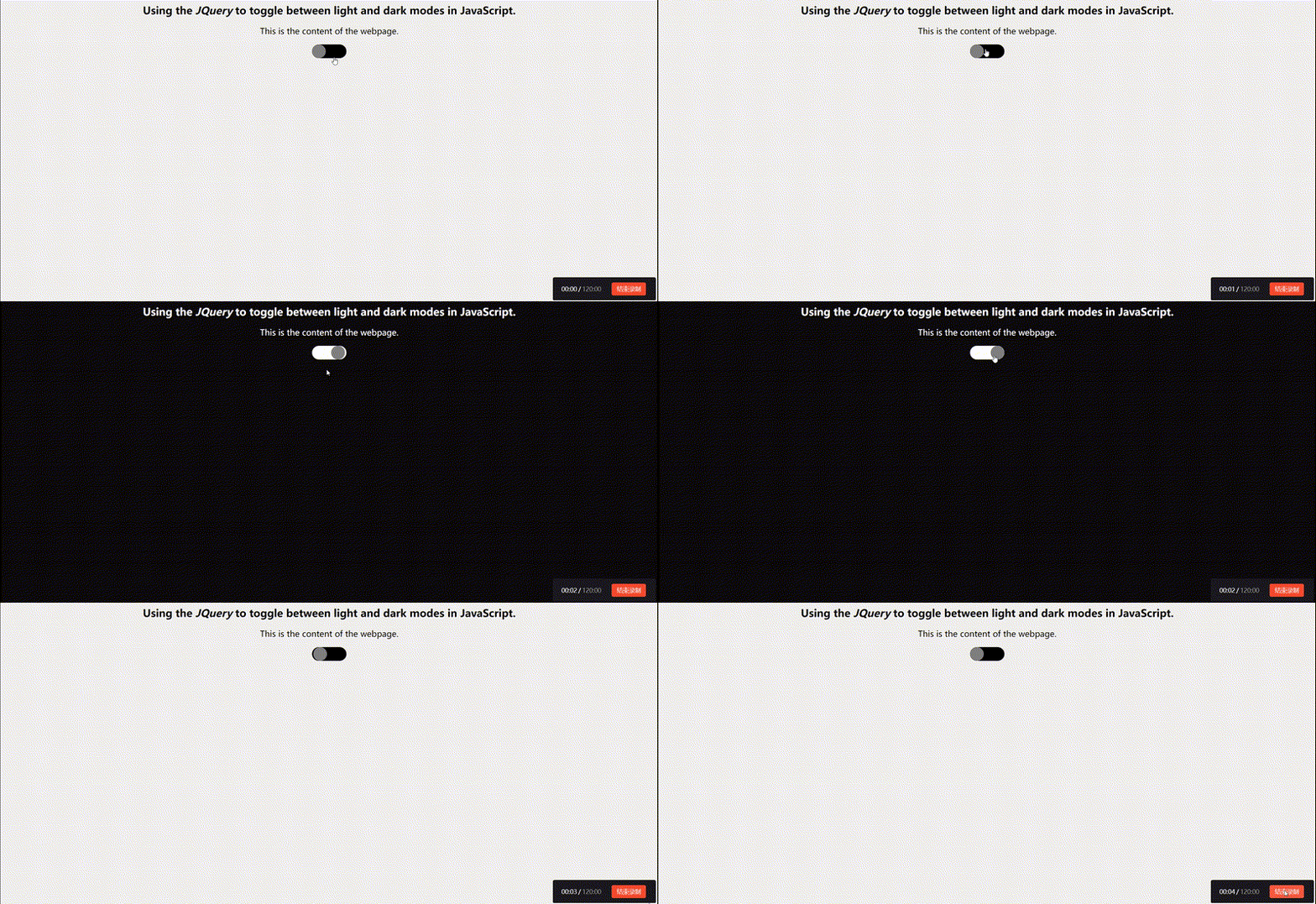
Show results